If you licensed your music from AudioJungle, a Content ID copyright notice doesn't mean you've infringed anything — it's simply YouTube detecting registered content, and you can clear it in a few steps using your license certificate.
Content ID is YouTube's digital fingerprinting system, used to identify copyrighted audio and video content. When an uploaded video matches registered content, a copyright notice appears, and the content owner can choose to:
- Clear the claim and take no further action.
- Track the video's viewership statistics.
- Monetize the video by running ads against it.
- Mute the matching audio.
- Block the video entirely.
Who are YouTube's Content ID partners?
Partner platforms manage Content ID on behalf of content owners, providing usage tracking, viewership reports, and monetization payouts. Current partners include FUGA (previously Adrev), Audiam, TuneCore, HAAWK/Identifyy, SourceAudio, and EliteAlliance.
How does this relate to AudioJungle music?
Many composers who sell music through AudioJungle — like other online composers — have their content digitally fingerprinted via Content ID to protect against unauthorized use. Every Envato Market purchase includes a license certificate and purchase code, which you can use to clear a copyright notice if one appears.
Does a copyright notice mean I've infringed a copyright?
No. A "matched third party content" notice simply means YouTube detected Content ID registered content in your video — it's not a copyright strike and doesn't mean you've done anything wrong. If you've licensed the music from AudioJungle, you can clear it easily.
Why are ads suddenly running on my video?
If unlicensed use of music is detected, YouTube's Content ID system may place monetized ads on the video automatically. Once you clear the copyright notice using your AudioJungle license certificate, these ads are removed — and you can choose to monetize the video yourself instead.
How do I know if a track is registered with Content ID?
Check the item description on the item page — registered tracks are called out directly, along with a "YouTube Content ID Registered: Yes/No" attribute and the name of the partner platform that administers it.
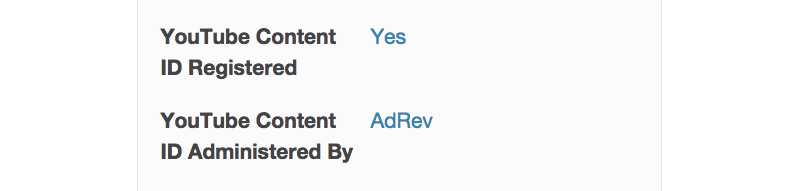
Note: This labeling policy started in April 2015, so some older items may not yet show this attribute. Check the item description for a note about Content ID, or contact the author directly via their profile page if you're unsure.
How do I clear a YouTube copyright notice?
You have three options:
- Dispute the claim directly through YouTube's built-in form.
- Contact the relevant Content ID partner directly. If the music is administered via FUGA, use FUGA's Claim Clearance page — they'll email you a confirmation once cleared. For other partners:
- Contact the author directly via their AudioJungle profile page with a link to your YouTube video — they can help clear the notice.
To clear a claim via YouTube directly:
- Click the "matched third party content" notice next to your video in Video Manager, or on your copyright notices page.
- Click "File a dispute", then select "I have a license or written permission from the proper rights holder to use this material."
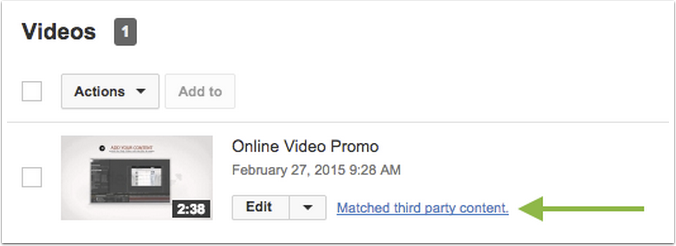
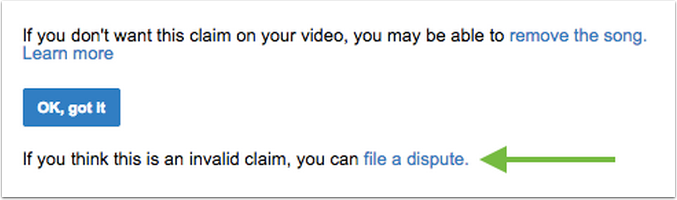
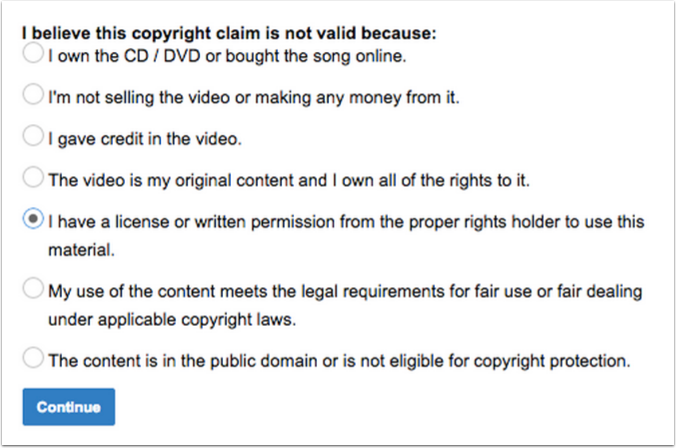
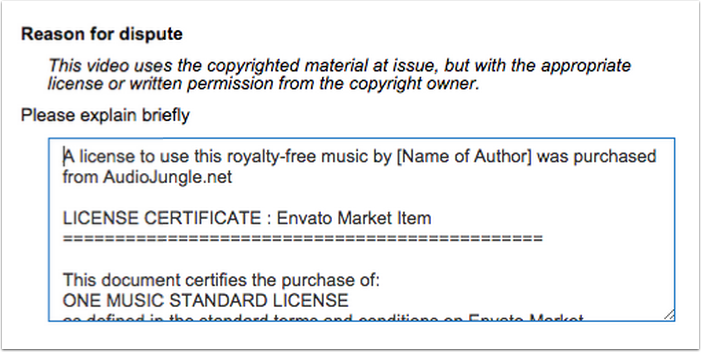
- In the "Reason for dispute" box, paste the contents of your purchased license certificate (found under Downloads in your account). You may also want to add: "A license to use this royalty-free music by [Name of Author] was purchased from AudioJungle.net."
Claims are usually cleared within 24 to 96 hours of submitting a dispute. If you run into issues, contacting the author directly via their profile page can help speed things up.
More resources:
- How to find your purchase code and license certificate
- YouTube's guide for users affected by copyright claims
- YouTube's guide to submitting documentation for monetization rights
How long does YouTube take to review a claim?
Once a dispute is lodged, follow up directly with YouTube — this part of the process is outside Envato's control.
How do I avoid copyright notices before I even publish?
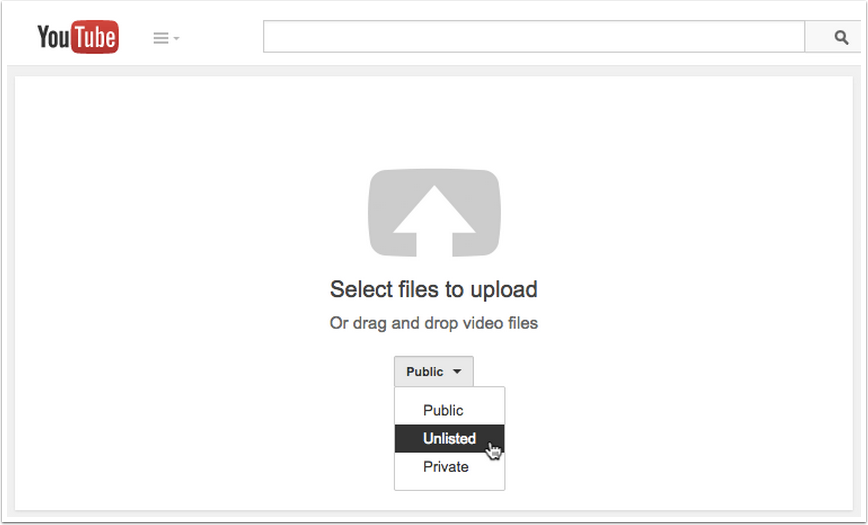
Upload your video as "Unlisted" first. If you've licensed Content ID-registered music, set your video to Unlisted when uploading, and wait for any "matched third-party content" notices to clear before making it Public. This way, your video can be monetized from the moment it goes live.
Whitelist your channel. If you or a client regularly use Content ID music from the same author, some partner platforms let you whitelist an entire YouTube channel, preventing future notices on new videos using that author's music.
To request whitelisting, contact the author directly via their AudioJungle profile page with:
- The contents of your purchased License Certificate(s).
- A link to the relevant YouTube channel (yours or your client's).
Note: Whitelisting may not be possible if the channel has existing, uncleared copyright notices from a different author — these need to be cleared individually first.
How do I clear a Content ID-style notice on Facebook or Instagram?
Follow the instructions in the notification email you receive from Facebook or Instagram, or visit their Help Centers directly: